
A cramped desk can become frustrating when your laptop, monitor and paperwork all compete for the same space. A height-adjustable desk gives you the option to change position during the working day without moving your equipment elsewhere. This review compares six complete electric desks, from affordable models for a spare bedroom to larger workstations and designs with built-in storage. We look at desktop size, lifting range, controls and practical trade-offs rather than assuming the most expensive model is automatically the best. There is also guidance on measuring your space and choosing a desk that fits both sitting and standing work.
Best Height Adjustable Desks for Home Offices
- Desktronic HomeOne 140 × 70cm Dual-Motor Standing Desk
- FlexiSpot E1 Plus 120 × 60cm One-Piece Standing Desk
- ErGear 140 × 70cm Electric Standing Desk
- FEZIBO 120 × 60cm Standing Desk with Double Drawers
- VASAGLE Balok 120 × 60cm Electric Standing Desk
- FlexiSpot Q3 120 × 60cm Standing Desk with Drawer and USB Charging
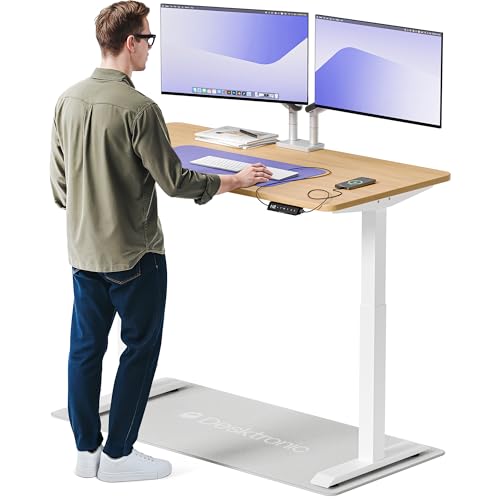
Desktronic HomeOne Dual-Motor Standing Desk – 140 × 70cm
The HomeOne suits a home office with two monitors, a laptop and equipment that stays on the desk all day. Its dual-motor lifting system is built for heavier setups, while the wide worktop leaves room for paperwork without crowding your keyboard.
Why We Like It
- The controller stores different sitting and standing heights for quick changes.
- Built-in charging keeps a phone connected without occupying another mains socket.
- Anti-collision detection can stop the desk if it encounters an obstruction.
- The deeper worktop gives a monitor arm more room behind the keyboard.
- The flush-mounted controls keep the front edge uncluttered.

FlexiSpot E1 Plus One-Piece Electric Standing Desk – 120 × 60cm
For someone who spends part of the day writing by hand, the E1 Plus has a particular advantage: its desktop is made in one piece. That smooth surface also suits a mouse and keyboard, while electric adjustment makes changing posture during work straightforward.
Why We Like It
- Four saved heights suit different users or preferred working positions.
- Side hooks provide a handy place for headphones after video calls.
- Pre-drilled fixing points make it easier to align the top during assembly.
- The maple-effect top and white frame suit a bright home office.

ErGear Electric Standing Desk – 140 × 70cm
Spreading out documents beside a widescreen monitor is easier on this 140cm ErGear desk than on a compact workstation. It gives you a generous working area at a relatively modest price, with electric adjustment for switching between seated tasks and standing calls.
Why We Like It
- Four programmable positions make returning to a preferred height quick.
- Two hooks give headphones and a bag a place off the work surface.
- Its vintage-wood finish brings warmth to a plainly furnished study.
- The joined desktop arrives in smaller sections that are easier to carry upstairs.

FEZIBO Electric Standing Desk with Double Drawers – 120 × 60cm
The FEZIBO makes particular sense in a bedroom that doubles as an office. Its raised screen shelf leaves a clear area for writing beneath the monitor, while the pair of drawers offers somewhere to put stationery away when the working day ends.
Why We Like It
- Three saved heights help when the desk is shared or used for different tasks.
- Electric lifting adjusts the worktop and monitor shelf together.
- Separate desktop sections are easier to carry into an upstairs room.
- Its white finish pairs naturally with lighter bedroom furniture.

VASAGLE Balok Electric Standing Desk – 120 × 60cm, White
If a spare bedroom has to serve as an office, the VASAGLE Balok provides electric height adjustment without taking over the room. Its simple, compact design suits a laptop and everyday paperwork, making it a sensible first step into sit-stand working.
Why We Like It
- Four saved positions make it easy to return to a comfortable height.
- Anti-collision detection offers an additional safeguard around nearby furniture.
- The joined desktop comes in smaller sections for easier handling during assembly.
- Cloud-white colouring works well alongside light-coloured home furnishings.

FlexiSpot Q3 Electric Standing Desk with Drawer – 120 × 60cm
The FlexiSpot Q3 is aimed at people who like their working surface clear but need everyday essentials within reach. Its discreet drawer stores notebooks and accessories, while charging ports built into the controls help keep a phone powered during long desk sessions.
Why We Like It
- Four height presets are useful when two people share the workstation.
- A child lock helps prevent accidental operation of the lifting controls.
- The electric lift allows changes of posture without moving your equipment.
- The white finish suits a home office that also serves as a guest room.
How to Choose the Right Height Adjustable Desk
Measure the Work Area and Desktop
Start with the space in your room rather than the maximum desk size you can afford. Measure the wall, skirting boards and clearance for opening doors, then allow room to pull an office chair back. A 100–120cm desktop is often enough for a laptop and one monitor. A 140cm-wide desk provides more freedom for a second screen, paper documents or a desktop computer. Depth matters too: 70cm gives more scope to position a monitor at a comfortable viewing distance than 60cm. Check the desk’s actual assembled dimensions, not only the size in its product name.
Check Both Ends of the Height Range
The lowest position matters as much as the highest. Your forearms should rest comfortably at the keyboard without raising your shoulders, with your feet supported when seated. When standing, aim for a relaxed elbow position and avoid having to bend your wrists upwards. A tall person may need a greater maximum height, while shorter users can struggle with desks that stop too high when lowered. Compare published height ranges carefully: some manufacturers measure the frame without the desktop. Try to measure your own seated and standing elbow heights before purchasing.
Match the Load Rating to Your Equipment
Add up the weight of monitors, arms, speakers, a desktop computer and anything you normally store on the desk. Leave a reasonable margin below the listed capacity. Check whether the figure applies while lifting or is a static load limit. Two motors can be useful with heavier equipment, but motor count alone does not guarantee better stability. Tall monitor arms and unevenly distributed weight can make even a strong frame feel less steady at maximum height. For a monitor clamp, confirm the top’s thickness, rear clearance and whether the edge is suitable for clamping.
Decide Between One-Piece and Joined Tops
A one-piece desktop has no central join and offers a continuous surface for writing or moving a mouse. Joined desktops can be cheaper to deliver and easier to carry upstairs, but the seam may be noticeable under a desk mat or when writing. Check what the top is made from and whether the surface can tolerate daily cleaning. A protective mat can help with hot mugs and scratches, whatever the finish. If the desktop has drawers or a raised shelf, make sure those additions do not obstruct monitor arms or your knees.
Consider Controls, Cables and Safety
Memory presets make it quicker to return to two or three preferred positions, particularly when a desk is shared. A child lock or anti-collision feature may provide extra protection, but you must still keep hands, cables and furniture clear of moving parts. Allow slack in monitor and power cables for the full height range, and secure trailing wires so they cannot catch on the mechanism. Check the supplied mains plug and assembly instructions, and never overload an integrated USB charging socket.
Move Regularly Rather Than Standing All Day
A sit-stand desk is a way to vary your posture, not a reason to remain standing for an entire shift. Alternate positions according to comfort, take short walking breaks and adjust the monitor and keyboard together. Your office chair should also allow a comfortable seated position, particularly if you need greater seat-height or seat-depth adjustment. Finally, compare warranty coverage for motors, controls and desktop separately, check whether spare parts are obtainable and keep your purchase details in case a lifting mechanism develops a fault.